Every plan · No add-ons

Everything the shop needs. Nothing it doesn't.

From estimates to invoices, scheduling to QuickBooks, work orders to follow-ups — every tool is connected, so your advisor never types the same thing twice.

See it running in your shop
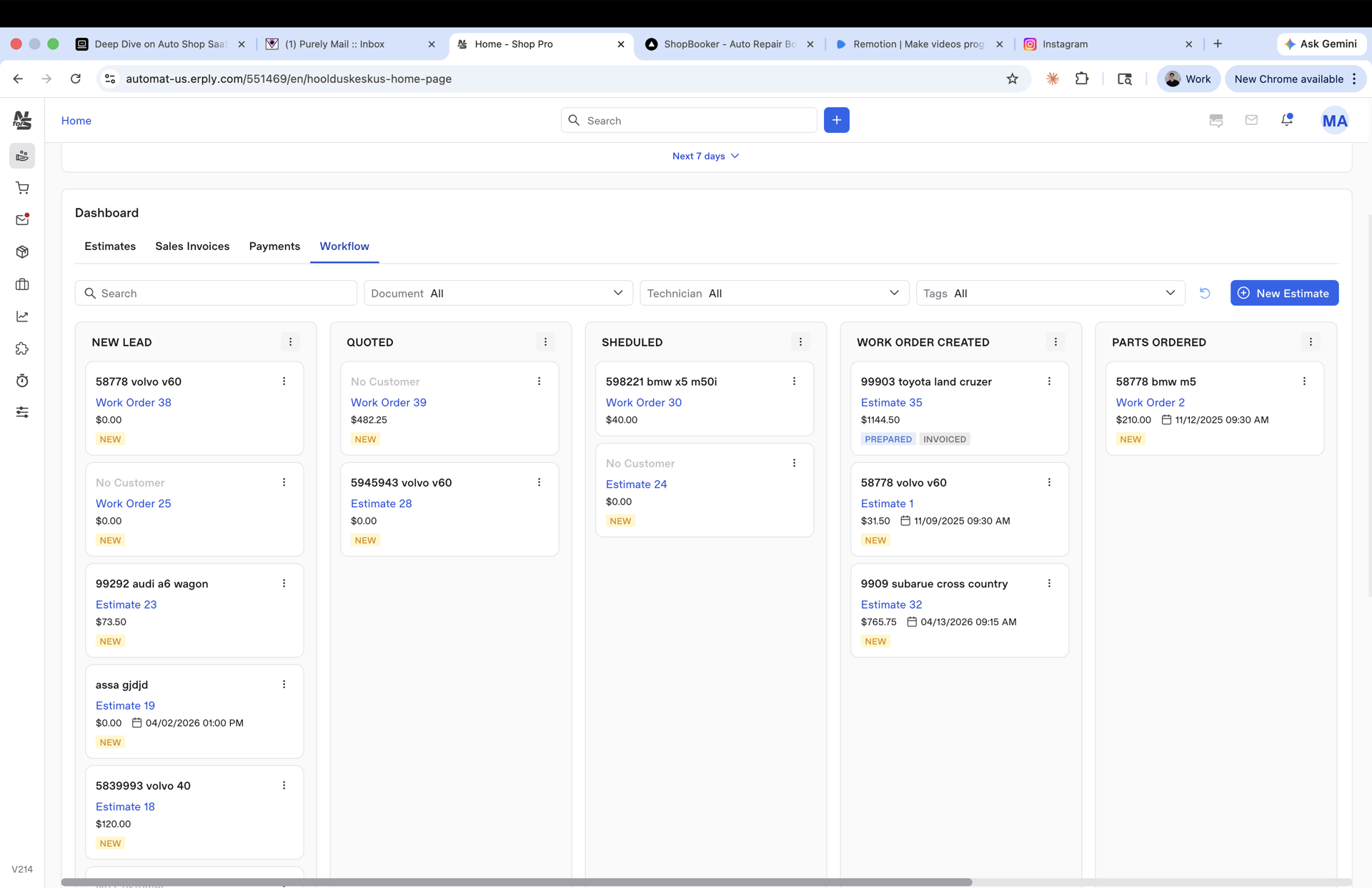
01 · Workflow Board

A drag-and-drop job board the whole shop can see.

Five columns out of the box: New Lead, Quoted, Scheduled, Work Order Created, Parts Ordered. Filter by tech, tag, or document type. Up to 100 cards in view with no slowdown.

  • Color-coded status, customer and vehicle at a glance
  • Drag a card, the calendar and RO update together
  • Replaces your whiteboard, your sticky notes, and one group chat
Learn more
app.needforservice.com / workflow
Workflow Kanban board — New Lead, Quoted, Scheduled, Work Order Created, Parts Ordered
02 · Estimate → Work Order → Invoice

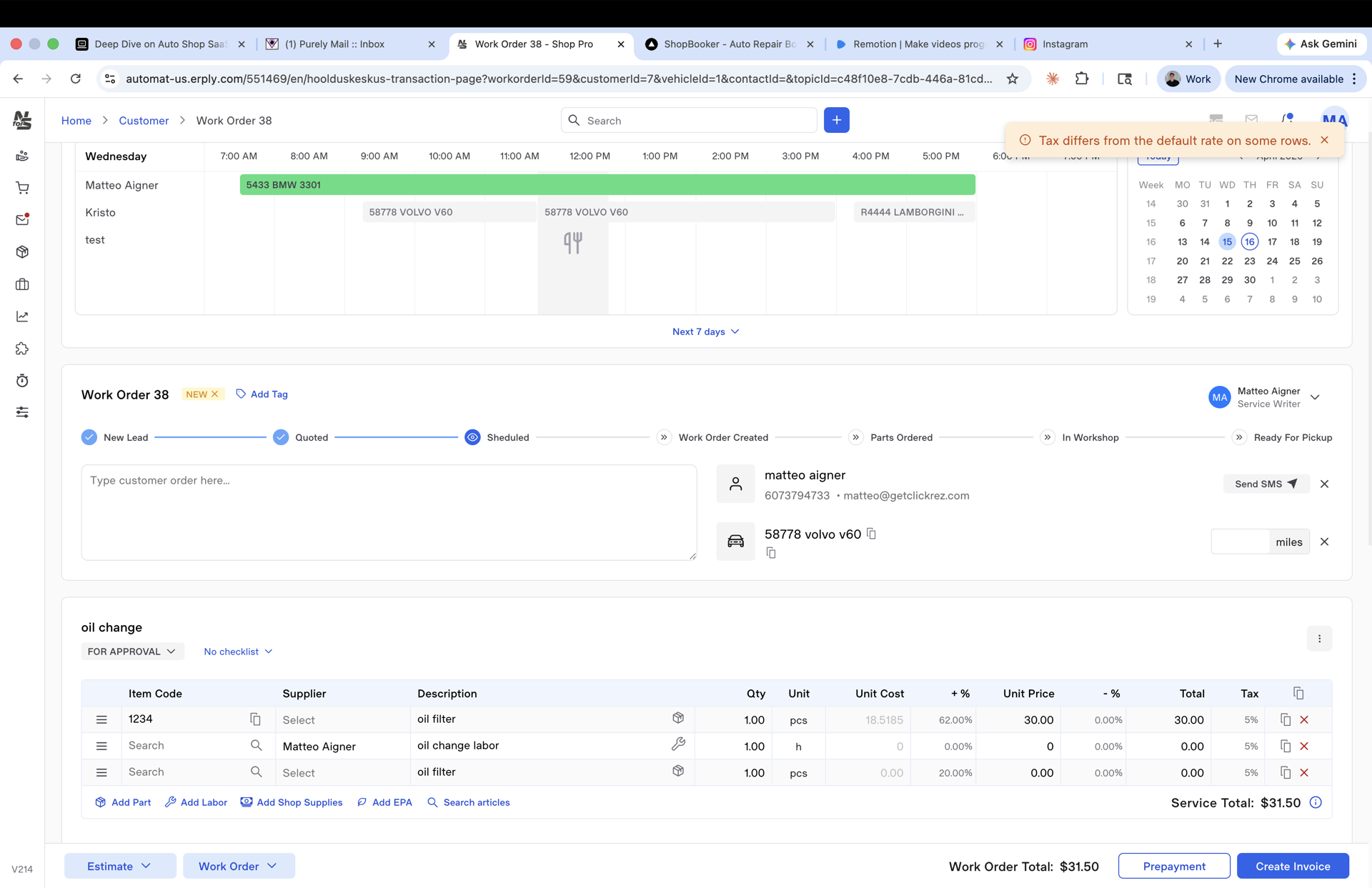
From estimate to invoice in one click. No retyping. Ever.

Line items, approvals, signatures, and tax all carry over when the repair order becomes the invoice. Your advisor isn't copying numbers across screens at 5:45 pm.

  • Progress bar from New Lead to Ready for Pickup
  • Supplier tagged per line item, PO generated in two clicks
  • Shop supplies and EPA fees calculate themselves
Work Order with line items, suppliers, approval status
Work Order #38 · in-progress
03 · Customer stack

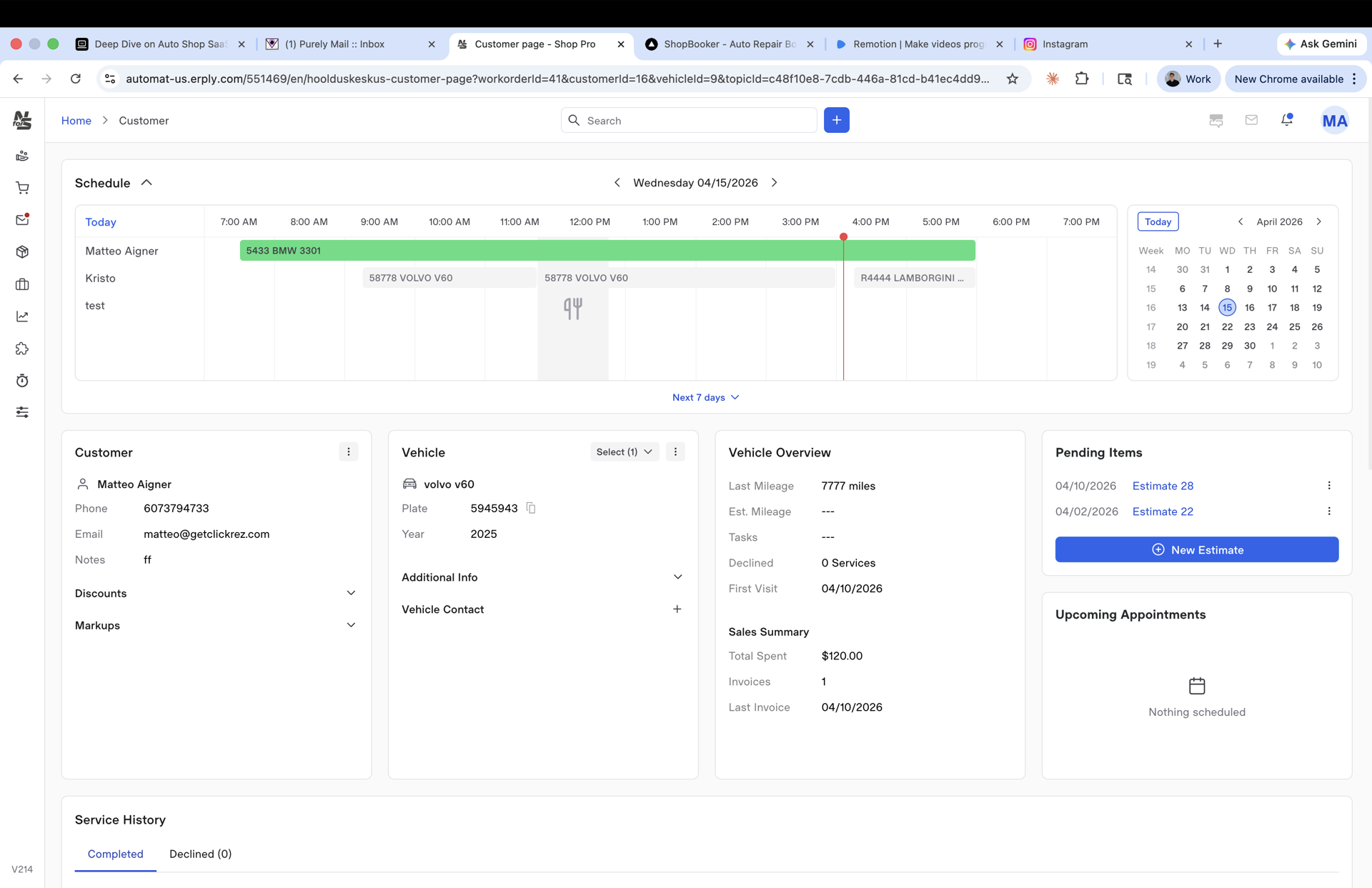
Every customer, every vehicle, every visit — one screen.

Schedule on top. Vehicle info in the middle. Service history below. Pending approvals pinned on the right so nothing sits for four days waiting on a yes.

  • Last visit, mileage, total spent — right there
  • Recurring services lined up — oil change, brake check, all on the record
  • One-click new estimate pre-populates vehicle and history
Learn more
Customer detail page — schedule, vehicle, service history
Customer · Matteo Aigner · 5878 Volvo V60
04 · Smart calendar & Tech View

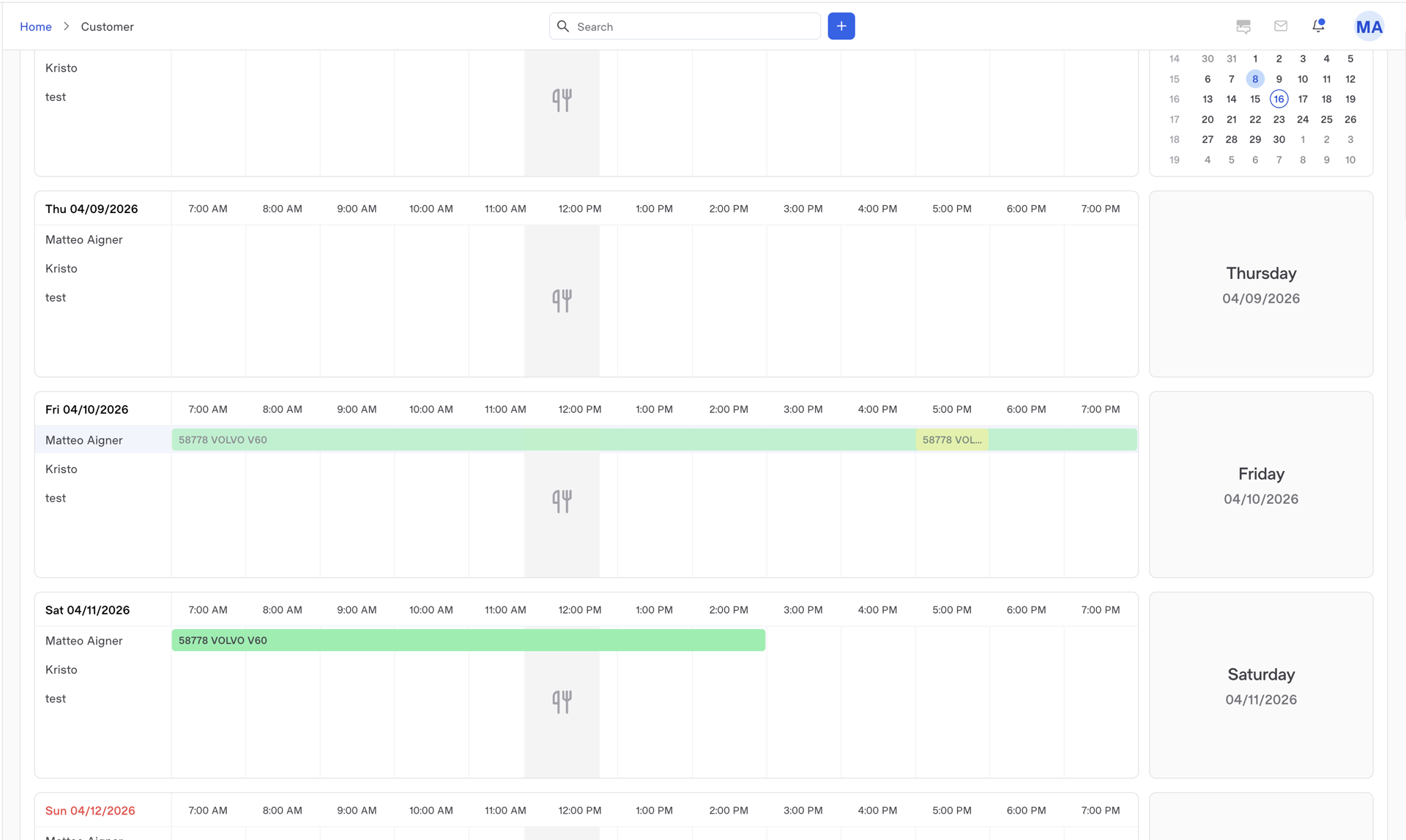
Scheduling that fits the way your shop runs.

Knows your business hours, your lunch break, and your bays. Your techs get a simple Tech View on their phone or tablet — just today's jobs, with clock-in built in.

  • Drag an appointment, SMS fires to the customer automatically
  • Tech View: no menus, no sidebars — just the next car
  • Clock-in / clock-out feeds the performance report
Learn more
Smart calendar with daily schedule
Schedule · Wednesday 04 / 15
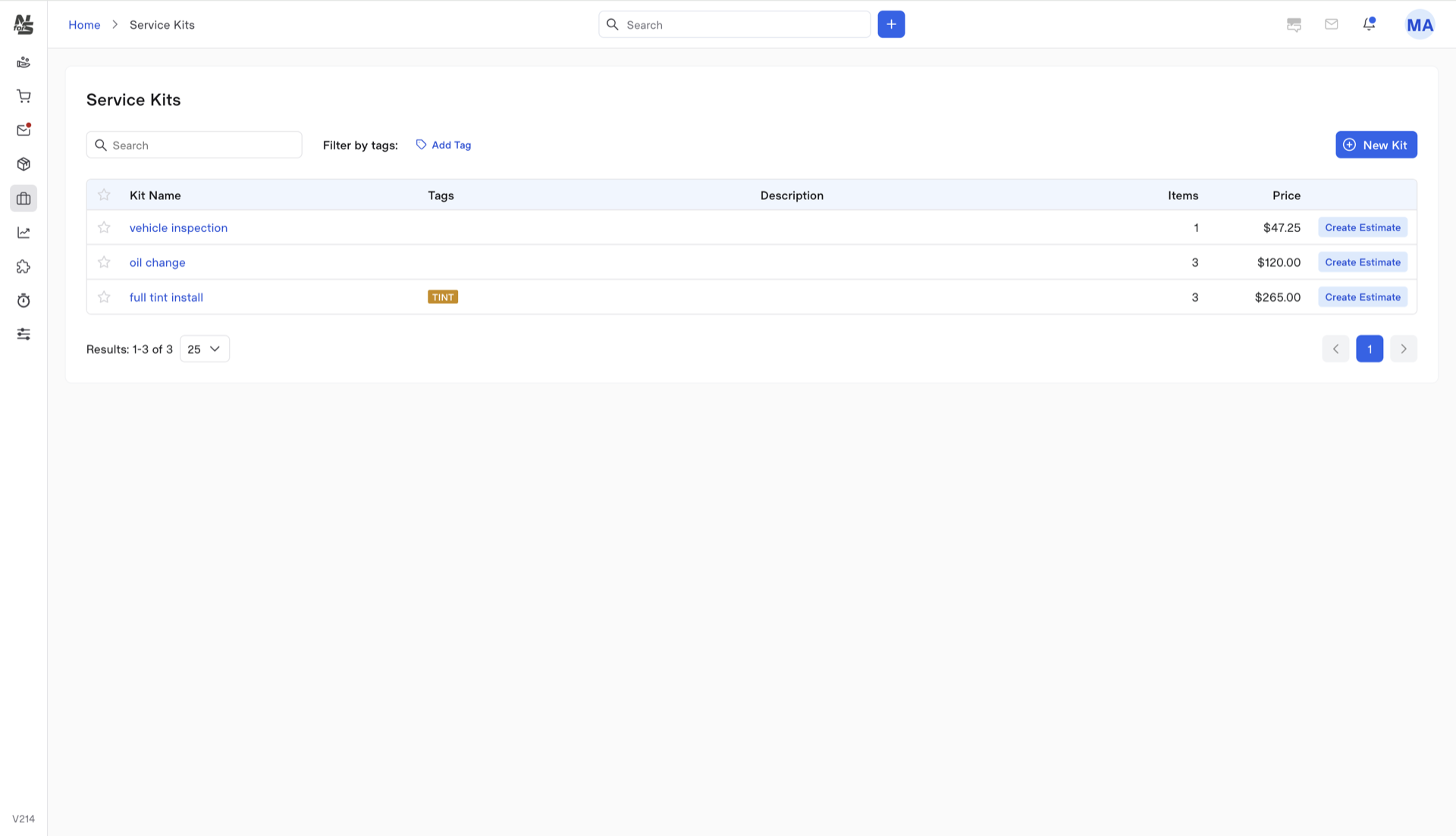
05 · Service Kits

Your 25 most-used jobs, one-click away.

Build a kit for LOF, timing belt, brake service, coolant flush — every part, labor line, and note baked in. Advisor types nothing.

  • Kit prices pre-calculated with margin and tax
  • Stack kits on one RO — LOF + tire rotation in one shot
  • Edit once, apply everywhere new
Learn more
Service kits library — pre-built packages
Service Kits · pre-built packages
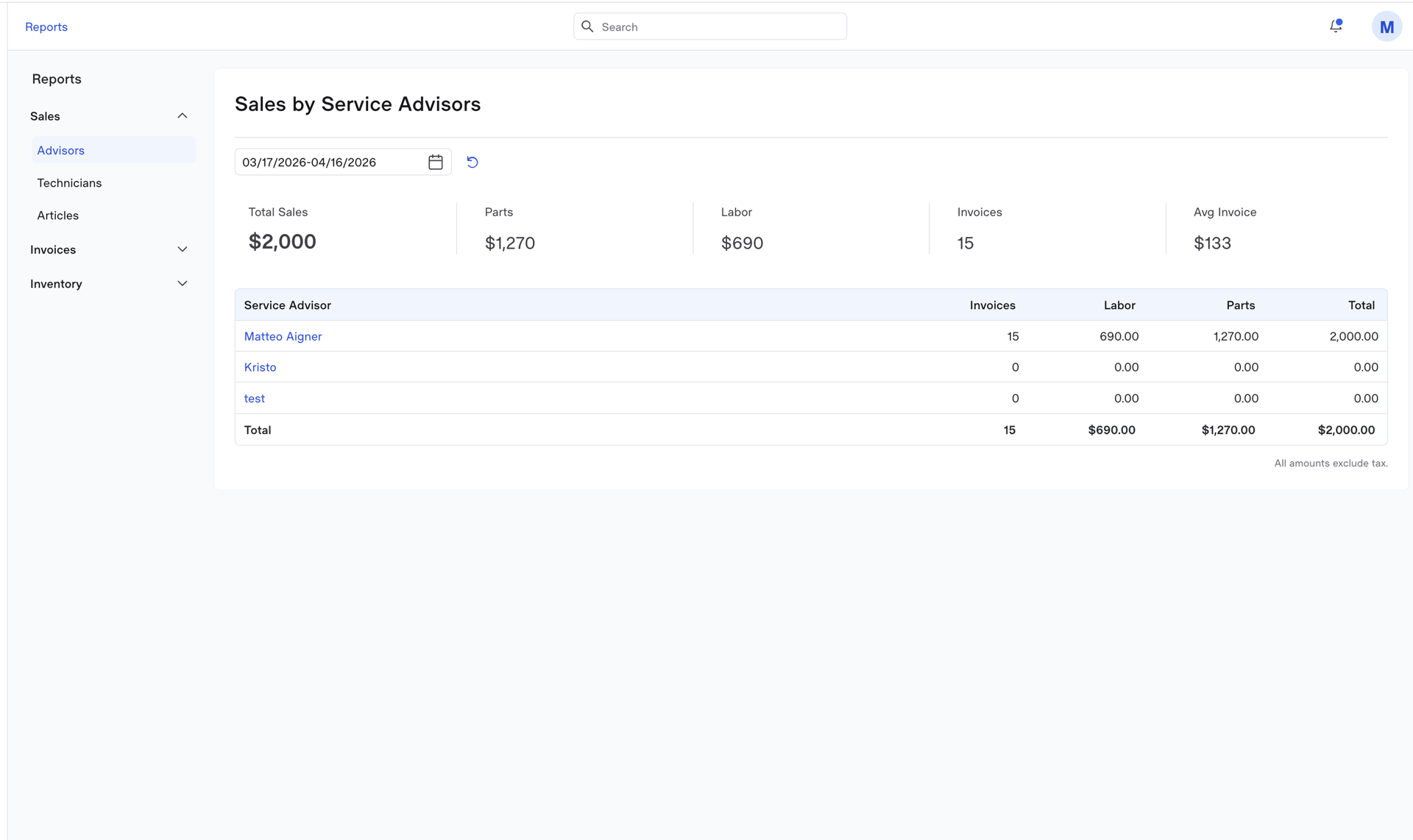
06 · Advisor & Technician reports

See exactly who's making money for the shop.

Labor sold, parts sold, hours clocked, revenue per tech, per advisor, per day. Export to CSV for your accountant. Nothing hidden behind an upgrade.

  • Hours billed vs hours clocked — per tech, per week
  • Labor ratio, parts ratio, effective labor rate
  • Daily P&L snapshot on the home dashboard
Learn more
Reports dashboard with performance metrics
Reports · labor & parts by period
Tech checklists

Checklists your techs follow on every job.

Build a checklist once. Your techs work through it on every matching job — every step logged on the work order, nothing missed, nothing forgotten.

  • Reusable templates per service type (brake job, oil change, pre-purchase)
  • Every step saved against the vehicle for next-visit reference
  • Works on any tablet, phone, or desktop your shop already uses
Learn more
Technician working through a checklist on a tablet inside the shop
And the rest

Twelve more tools every shop needs.
All included.

The extras other platforms charge for — email, SMS, reminders, tech checklists, extra users. All bundled. All inside.

Service advisor working through the day's ROs from one screen
07

Built-in email & SMS

A real inbox inside the app. Reminders, estimates, and approvals send straight from the platform and stay on the customer timeline.

08

Custom tech checklists

Build a reusable checklist for any job — brake, LOF, MPI. Techs work through it on a tablet, and every step logs straight to the work order.

09

Shop supplies & EPA auto-add

Configurable percentages and caps. They attach themselves to every RO so you stop eating the cost.

10

Digital signatures

Customer approves on their phone or in the lobby. For-approval / approved / declined statuses tracked per line.

11

Vehicle history stacking

Every visit, every invoice, every part installed — pinned to the vehicle. Searchable and exportable.

12

Recurring service tracker

Oil changes, brake jobs, fluid flushes — every recurring service stays on the vehicle and queues up for the next reminder.

13

Mileage & interval reminders

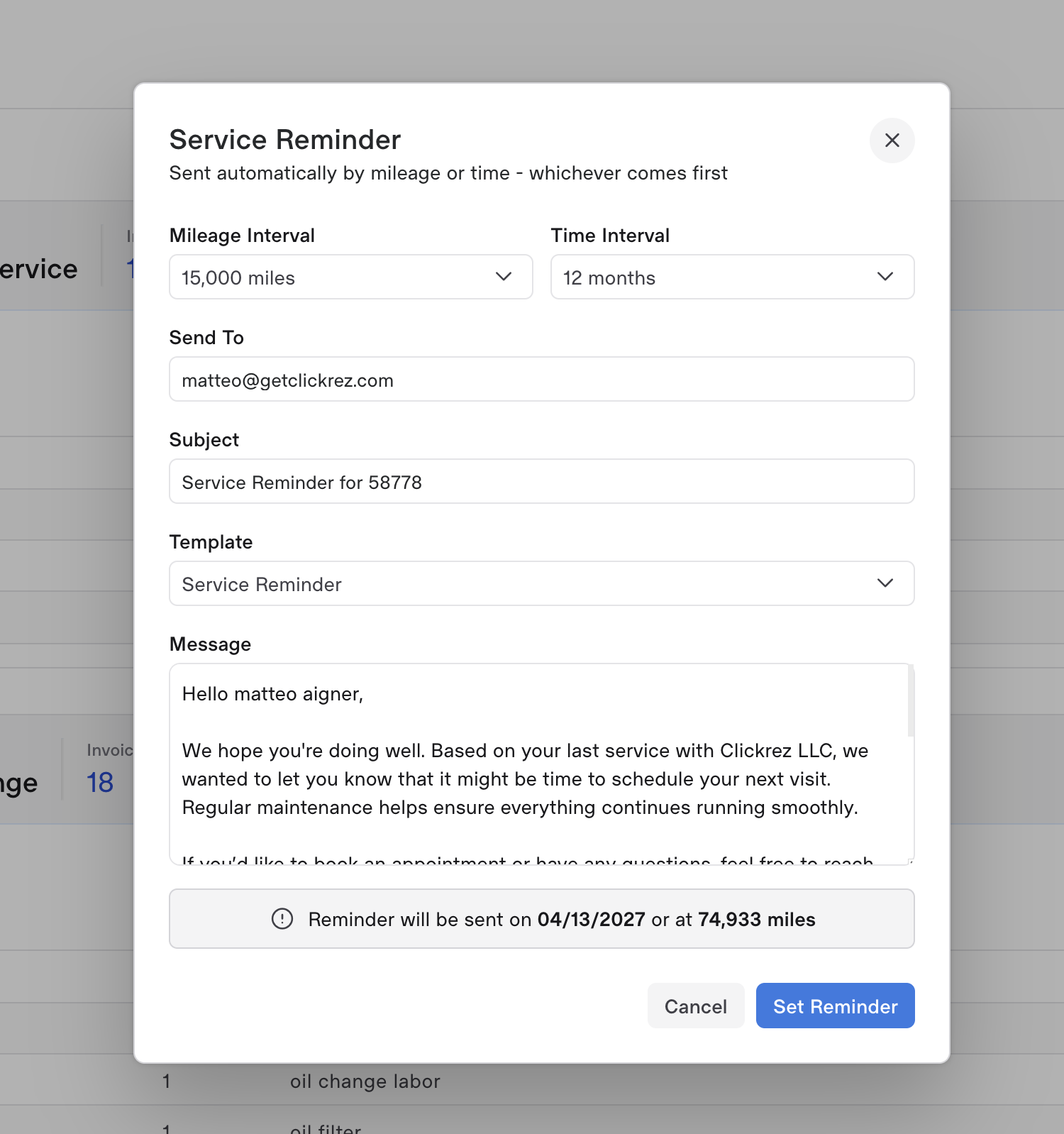
Configure by job type: 5,000 miles, 6 months, whatever. Fires by SMS and email automatically.

14

Tax & tax-exempt handling

Configurable rates by location, tax-exempt flag per customer. Reports show taxable vs. non-taxable.

15

QuickBooks integration

Invoices, payments, customers, and tax sync. Your accountant stops emailing you at 10 pm.

16

Supplier management

Directory of every supplier, payment terms, and recurring purchase orders. Parts ordered flag feeds into it.

17

Multi-language UI

EN, ES, ET, RU, FI, PT, EL all live today. Each user picks their own language — built for shops where the team doesn't all speak the same one.

18

Cloud-hosted, nightly backups

Redundant servers, snapshotted every night. You'll never lose a ticket to a dead hard drive or a spilled coffee.

Follow-ups

Bring customers back when their next service is due.

Every recurring job sticks to the vehicle. Oil change every 5,000 miles, brake check every six months, transmission flush every two years — when it's time, the system texts the customer. On your letterhead, in your tone, with the price they paid last time.

Real shop math: bring back 3 customers a month for a $240 service = $8,640 / year per bay.
Learn more
Reminder setup — mileage and interval based follow-ups
Reminders · by mileage or interval
Payments & Card Terminals

Run a card. Close the invoice. Move on.

Need for Service integrates with payment processing and shop-ready card terminals. Tap, chip, and swipe — the invoice closes the moment the card clears, and QuickBooks gets the entry in the same breath.
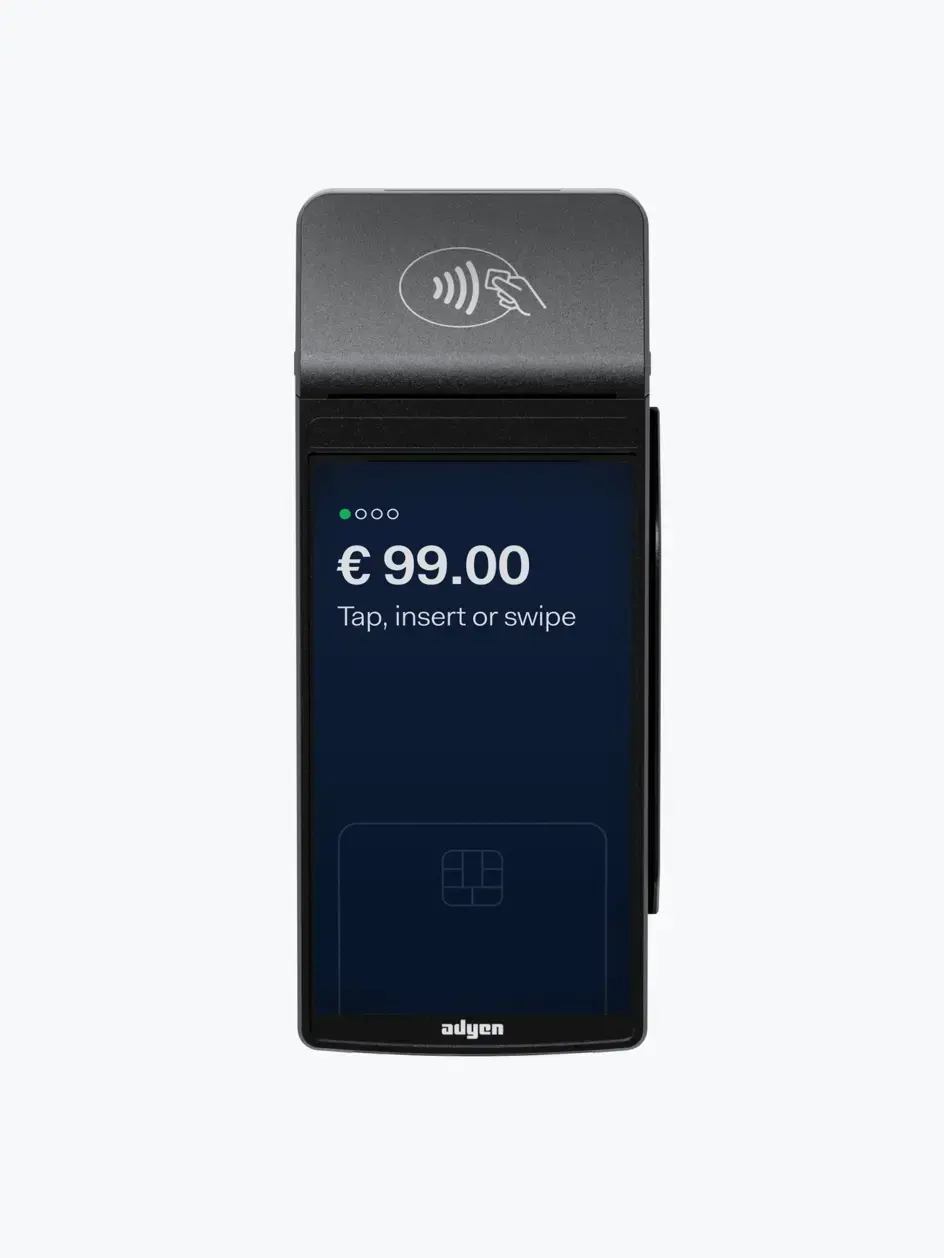

  • Wireless terminal pairs with your shop in 3 minutes
  • Accepts every major credit and debit card
  • Auto-reconciles to QuickBooks — no end-of-day manual entry
  • Flat per-transaction rate. No monthly terminal fee.
Learn more
Wireless card terminal with contactless reader
Visa · 4242 · approved
Matteo Aigner — Volvo V60
$487.50
RO #1287 Synced · QuickBooks 10:42
Today
$4,287.30
12 cards · all settled
QuickBooks Integration

Your accountant stops emailing you at 10 pm.

Invoices, payments, customers, and tax all sync to QuickBooks Online automatically — line by line, in real time. No CSV exports, no manual rekeying, no end-of-month panic. The books are already done.

  • Every invoice posts to QuickBooks the moment it's closed
  • Payments, refunds, and tax — all mapped to the right GL accounts
Learn more
QuickBooks Online
Connected · Synced just now
12
today
Matteo Aigner
INV-1287 · Volvo V60
$487.50
Maria Garcia
INV-1286 · F-150
$189.00
Anil Patel
INV-1285 · Civic
$325.20
Soo-jin Kim
INV-1284 · Tundra
$642.10
$4,287.30
Synced today
0
Errors
10:42
Last sync
See it live

15 minutes. Your questions. Real workflows.

We'll walk you through Need for Service live — no slides, no sales pitch. If it doesn't fit your shop, we'll tell you.